Agencies & catalogs
Clear backgrounds across a whole product catalog in one batch.

Queue a folder of clips and get a batch transparent background on every one — no opening files one at a time, just a transparent background bulk export with full alpha.

Reviewed by RemoveVideoBG TeamUpdated
Before / after
Drag any sample to see the consistent matte each file gets in a batch transparent background run, so you know the whole queue will match before you process multiple videos at once.
Keep skin, hair, and soft edges clean on talking-to-camera clips.
Fast motion and water spray stay sharp through the cutout.
Cut animated characters out of any rendered scene.
Isolate stylized characters for compositing and overlays.
Talking-head unboxing and product clips with clean edges.
Drop AI-made clips onto any background in seconds.
Keep skin, hair, and soft edges clean on talking-to-camera clips.
Fast motion and water spray stay sharp through the cutout.
Cut animated characters out of any rendered scene.
Isolate stylized characters for compositing and overlays.
Talking-head unboxing and product clips with clean edges.
Drop AI-made clips onto any background in seconds.
Why it works
Parallel processing, consistent mattes, and no watermark — a transparent background bulk run handles the whole folder while you step away.
Upload dozens of clips at once and queue them together, instead of reopening the tool file after file to cut each one out. Shared settings apply to the entire queue, so one batch transparent background run uses the same backdrop and format across every upload — exactly what you want when a folder of clips all needs to match for the same project or product line.
Remove BackgroundThe queue runs back to back on its own, so a transparent background bulk job finishes while you work on something else entirely. You set it up once and walk away rather than babysitting each render, which is the whole reason to process multiple videos as a batch instead of opening, exporting, and closing them one tedious clip at a time.
Try it freeEvery clip gets the same hair-fine matte and full alpha, so a batch never has one cutout that looks rougher than the rest. Consistency is what makes a batch transparent background usable in a catalog or an ad set, where mismatched edges would stand out the moment the clips sit side by side on the same page or in the same feed.
Change BackgroundEach batch video cutout exports as a transparent WebM that drops straight into your timeline, with alpha already baked in. There is nothing to key on your side, so a whole transparent background bulk set composites in minutes — stack, scale, and place each subject over any scene the way you would a normal layer, with no per-file cleanup.
Start NowStep by step
Upload the whole set, let the queue run hands-free, and download every transparent cutout — three steps to a batch transparent background with no per-file editing in between.
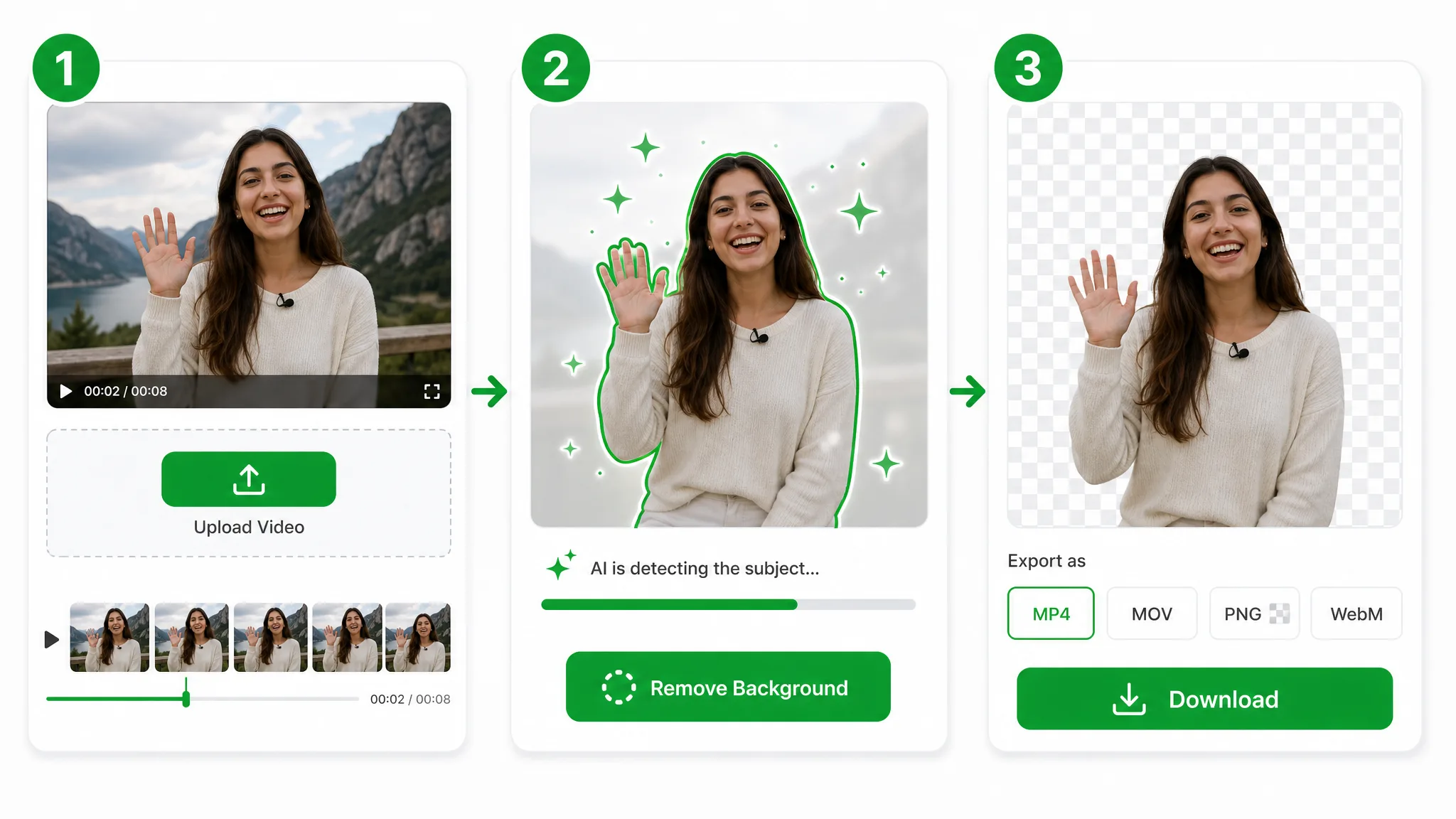
Drop in multiple MP4, MOV, or WebM files at once — no need to open them one clip at a time before each transparent cutout.
The AI runs every upload back to back, so a transparent background bulk run finishes hands-free — no keyframing, green screen, or per-file masking.
Grab each transparent WebM with full alpha — a whole set of clean cutouts ready to drop into any editor that supports alpha video.
Where it helps
Product catalogs, course libraries, and ad variants — run a transparent background bulk job across the whole batch at once when every clip has to match for the same project.
Clear backgrounds across a whole product catalog in one batch.
Cut out instructors across an entire lesson library at once.
Give every listing a clean background without one-by-one edits.
Process a week of short clips together and post on schedule.
FAQ
Common questions on queue size, supported formats, and keeping quality consistent across a batch transparent background run.
Upload the whole set and queue one batch transparent background job. The AI processes every clip back to back with shared settings, then lets you download each cutout — no opening files one at a time and no per-clip setup before the queue runs.
Yes. A transparent background bulk run happens entirely in the browser, with no timeline, no masking, and no green screen to set up per file. Drop in the folder, let the queue work, and collect a clean transparent WebM for every clip.
It lines them up to process multiple videos back to back from a single upload. One batch transparent background queue handles the whole folder hands-free, applying the same backdrop and format to each so the finished set stays uniform.
Yes. Each batch video cutout in the queue gets the same hair-fine matte and full alpha, so quality stays consistent across the whole transparent background bulk set — no clip ends up rougher than the rest when they sit together.
MP4, MOV, and WebM all work, and you can mix them freely. Drop them into one batch transparent background upload and export a transparent WebM with full alpha for each, ready to composite straight into any editor.
Short clips use the Basic tier, and longer ones move to Pro or Ultra. Either way you can still run the full batch transparent background queue in one go — the queue size is not capped, only the per-clip length sets the tier.
Related tools
Other tools for removing, replacing, and keying video backgrounds.

Upload one recording and remove background video 30 minutes long with automatic Basic segmentation and rejoining. Get one video-only WebM or MP4 in the format for your selected background.
Try now
Delete video background online — upload a clip, run the same workflow as the general video background remover, and export transparent WebM. This URL covers delete wording, not a separate engine.
Try now
Switch from Unscreen and cut any video background for free — no upload cap, no watermark. The same one-click cutout for an unscreen video export or a looping unscreen gif, nothing to install.
Try nowUpload your clips and run a batch transparent background job — free, no watermark, every cutout exported with full alpha.
Run a Batch Transparent Background — Free