E-commerce & product
Put products on clean or custom backgrounds for listings and ads.

Start free and run a clean video cutout online — this Cutout alternative cuts any clip in one click, with no watermark and a real transparent export instead of a flattened preview.

Reviewed by RemoveVideoBG TeamUpdated
See it side by side
Slide between the raw clip and the isolated subject to check the edges and hair detail first, then decide whether your next cutout is worth doing here instead — the sample is right here on the page.
Keep skin, hair, and soft edges clean on talking-to-camera clips.
Fast motion and water spray stay sharp through the cutout.
Cut animated characters out of any rendered scene.
Isolate stylized characters for compositing and overlays.
Talking-head unboxing and product clips with clean edges.
Drop AI-made clips onto any background in seconds.
Keep skin, hair, and soft edges clean on talking-to-camera clips.
Fast motion and water spray stay sharp through the cutout.
Cut animated characters out of any rendered scene.
Isolate stylized characters for compositing and overlays.
Talking-head unboxing and product clips with clean edges.
Drop AI-made clips onto any background in seconds.
Why people switch
No watermark, pay-per-second pricing, and a true alpha export — the parts of Cutout that usually sit behind a paywall, included here with every clip you cut, right down to a quick social clip.
Download a transparent clip with nothing stamped across it, so you can ship straight into a client edit instead of paying to lift a logo off the frame. Where Cutout meters clean exports behind a credit balance, this alternative hands you a finished cutout from the first export — a video cutout free of any logo to crop out before you deliver.
Remove BackgroundYou upload, the subject is cut out, and you download — there is no image-first detour and credits are charged only per second processed, so each video cutout free of watermarks stays quick to finish. Cutout bundles background removal inside a broader suite; here a video cutout online is the whole tool, which is what keeps it quick for a single transparent clip.
Try it freeYour subject lands on a transparent layer ready to composite, rather than a flattened MP4 with a colored rectangle behind it. Drop the WebM over any scene in your editor and the edges hold, with no box to key out and no halo where the background used to be — the transparent export most people open a video cutout tool to get.
Change BackgroundFeed it a green screen cutout mp4 and it keys the subject automatically, or hand it a normal handheld clip and it still separates the subject cleanly. There is no chroma color to set and no studio needed, so one video cutout online covers both a lit green stage and everyday phone footage.
Start NowThe flow
Upload your footage, let the AI cut the subject out, and download a transparent WebM with full alpha — the same idea you knew in Cutout, minus the watermark and the image-first detour. Need a flat result instead? Take the MP4 on a new background at the end.
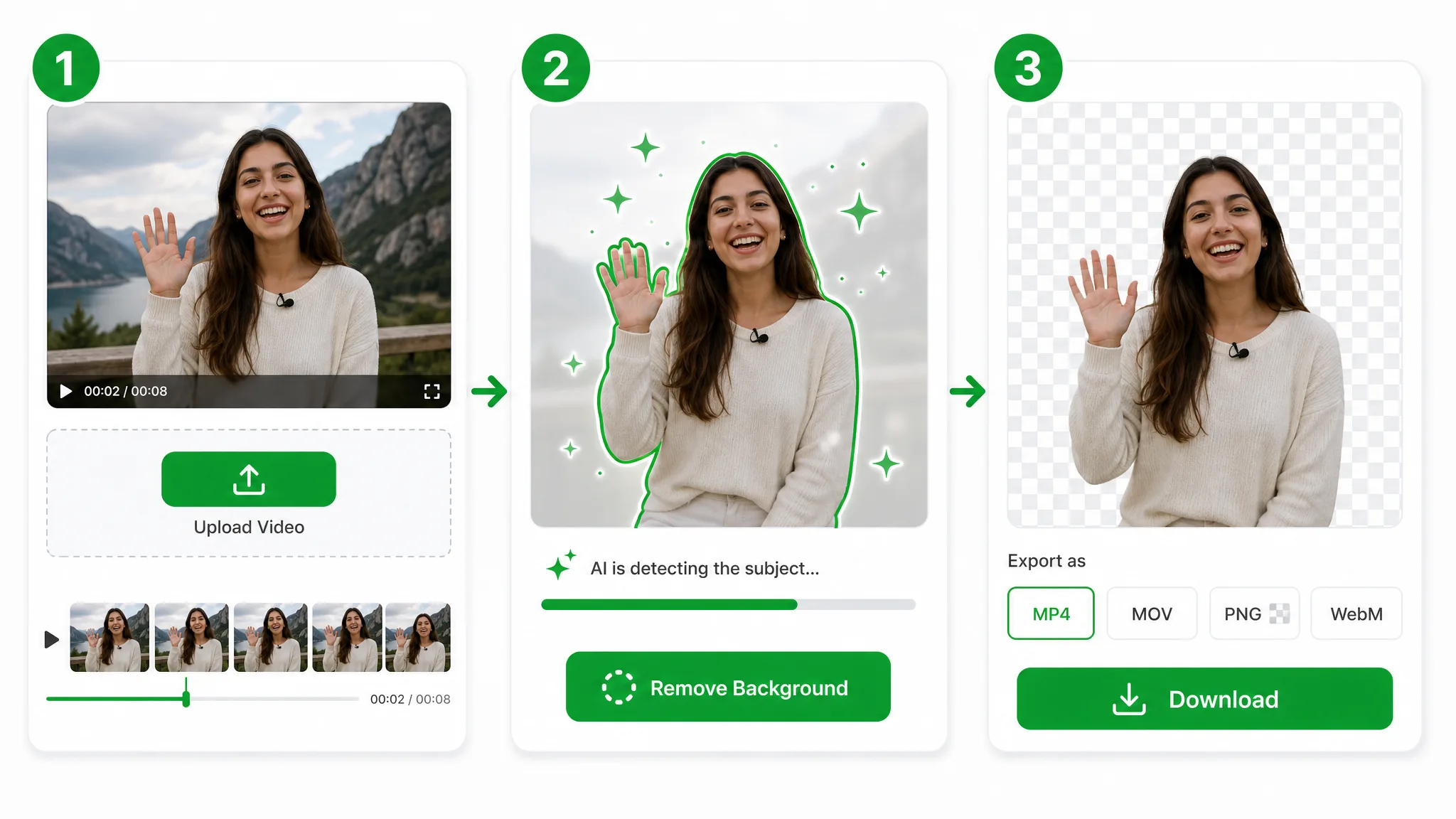
Drop in the same MP4, MOV, or WebM you would have handed to Cutout — it uploads straight to secure storage for a video cutout online — you can start for free, with nothing to install first.
The model isolates your subject frame by frame, the way a good video cutout should — no green screen required, no manual masking, and no per-frame rotoscoping on your part.
Export a transparent WebM with full alpha, watermark-free, so the cutout drops onto any scene right away. Keep it as a video layer, or take a flat MP4 on a new background when you do not need transparency.
Put it to work
Talking-head intros, product loops, and reaction overlays — cut the subject out the way a Cutout alternative should, then drop the transparent clip onto any background, thumbnail, or web scene.
Put products on clean or custom backgrounds for listings and ads.
Cut yourself out for Reels, Shorts, and TikTok overlays.
Create facecam overlays without a studio setup.
Place yourself over slides and screen recordings.
FAQ
Common questions on pricing, watermarks, transparent export, and how a video cutout online differs from the Cutout workflow before you switch.
It is free to start, and every video cutout free of watermarks comes out clean. Where Cutout meters exports behind a credit balance, this tool keeps the cutout clean from the first export, and credits are charged per second processed, so you pay only for the footage you actually cut.
It does one job well. You upload, the AI cuts the subject out, and you download — no image-first detour and credits charged only for the seconds you process, which makes it a faster cutout pro video alternative for a pure transparent clip than a general-purpose Cutout workflow.
It exports a real alpha channel in WebM. The cutout composites onto any scene with the edges intact, whereas Cutout often shows a flattened preview or bakes a solid color behind the subject; here you get a genuine transparent WebM, or an MP4 on a new background if that is all you need.
Yes — upload green screen footage and it keys the subject out automatically. A green screen cutout mp4 comes back as a clean transparent clip, so you do not set the chroma color by hand, and the same flow works just as well on ordinary non-green footage.
No. The subject is separated from any ordinary background automatically, so no studio, cloth, or chroma stage is required. A handheld phone clip works as well as a lit shoot — the model reads your subject straight from the footage for a clean video cutout.
MP4, MOV, and WebM all work as input, with no cutout video enhancer patch to install first. Upload any of them and export a transparent WebM with full alpha — the same sources you would have loaded into Cutout, with a clean, watermark-free alpha export at the end.
| Feature | This tool | Cutout |
|---|---|---|
| Transparent export | Real WebM (VP9) alpha export straight from the browser | Cutout often returns a flatter or more gated export path |
| Quick test without watermark | Free to start and watermark-free | Cutout is more likely to gate clean exports behind plan limits |
| Workflow setup | Upload, remove, and download without a timeline rebuild | Cutout usually asks for more app-side steps or editor cleanup |
Keep exploring
Other one-click tools for lifting a subject off its background, each focused on a single job.

Skip the full editor and cut any clip for free — this VEED AI background remover alternative runs online with no watermark and no timeline to set up, then hands back a transparent WebM with alpha.
Try now
Switch from Unscreen and cut any video background for free — no upload cap, no watermark. The same one-click cutout for an unscreen video export or a looping unscreen gif, nothing to install.
Try now
Run a faster CapCut remove background flow online — one click, no Pro plan, no watermark, no chroma key CapCut setup, just a true transparent export.
Try nowUpload a clip and run a clean video cutout online in seconds — free to start, with every video cutout free of watermarks. Whether it ends up a full edit or a quick social clip, the export comes out clean.
Try the Free Video Cutout — Online