E-commerce & product
Put products on clean or custom backgrounds for listings and ads.

Need to remove background davinci resolve style without the node graph? Do it online for free — one click pulls your subject out, with no qualifier nodes and a clean transparent export.

Reviewed by RemoveVideoBG TeamUpdated
Check the edges
Wipe across the sample to judge the cutout against what a manual qualifier pass would give you — the remove background davinci resolve result, without the node tree.
Keep skin, hair, and soft edges clean on talking-to-camera clips.
Fast motion and water spray stay sharp through the cutout.
Cut animated characters out of any rendered scene.
Isolate stylized characters for compositing and overlays.
Talking-head unboxing and product clips with clean edges.
Drop AI-made clips onto any background in seconds.
Keep skin, hair, and soft edges clean on talking-to-camera clips.
Fast motion and water spray stay sharp through the cutout.
Cut animated characters out of any rendered scene.
Isolate stylized characters for compositing and overlays.
Talking-head unboxing and product clips with clean edges.
Drop AI-made clips onto any background in seconds.
Why skip the node graph
No qualifiers, no tracking, and no render — the remove background davinci resolve result you were after, without the Fusion nodes and color-page masking.
Skip building a qualifier, refining mattes, and tracking the mask across every frame. The subject is separated automatically the moment your file finishes uploading, with no Fusion graph to assemble. This is the whole reason to remove background davinci resolve work this way: a task that normally means a careful node tree on the Color page collapses into one upload, and the cutout comes back clean.
Remove BackgroundNothing renders locally, so an aging laptop handles the cutout exactly as a workstation would, with no Studio license or hardware decode to budget for. A manual davinci resolve background remover pass leans hard on your GPU and a paid tier for the better tools; here the processing happens online, which means slow exports and render-time crashes stop being part of the job.
Try it freeYour subject comes back on a transparent layer that drops straight onto your timeline, instead of arriving as a flattened clip you have to key all over again. That genuine alpha is what makes the remove background davinci resolve round-trip painless — reimport the WebM, stack it over a new plate, and the edges hold with no second matte to build.
Change BackgroundIt lifts the subject from any real-world background, so there is no chroma stage to light, shoot, or clean up before the cutout works. Where a green screen remover davinci resolve setup assumes you already captured against an even green wall, this reads an ordinary clip directly, which means location footage and handheld phone shots separate just as cleanly.
Start NowThe flow
Upload your clip, let the AI separate the subject, and download a transparent WebM with full alpha — three steps where a manual remove background davinci resolve pass would take a dozen.
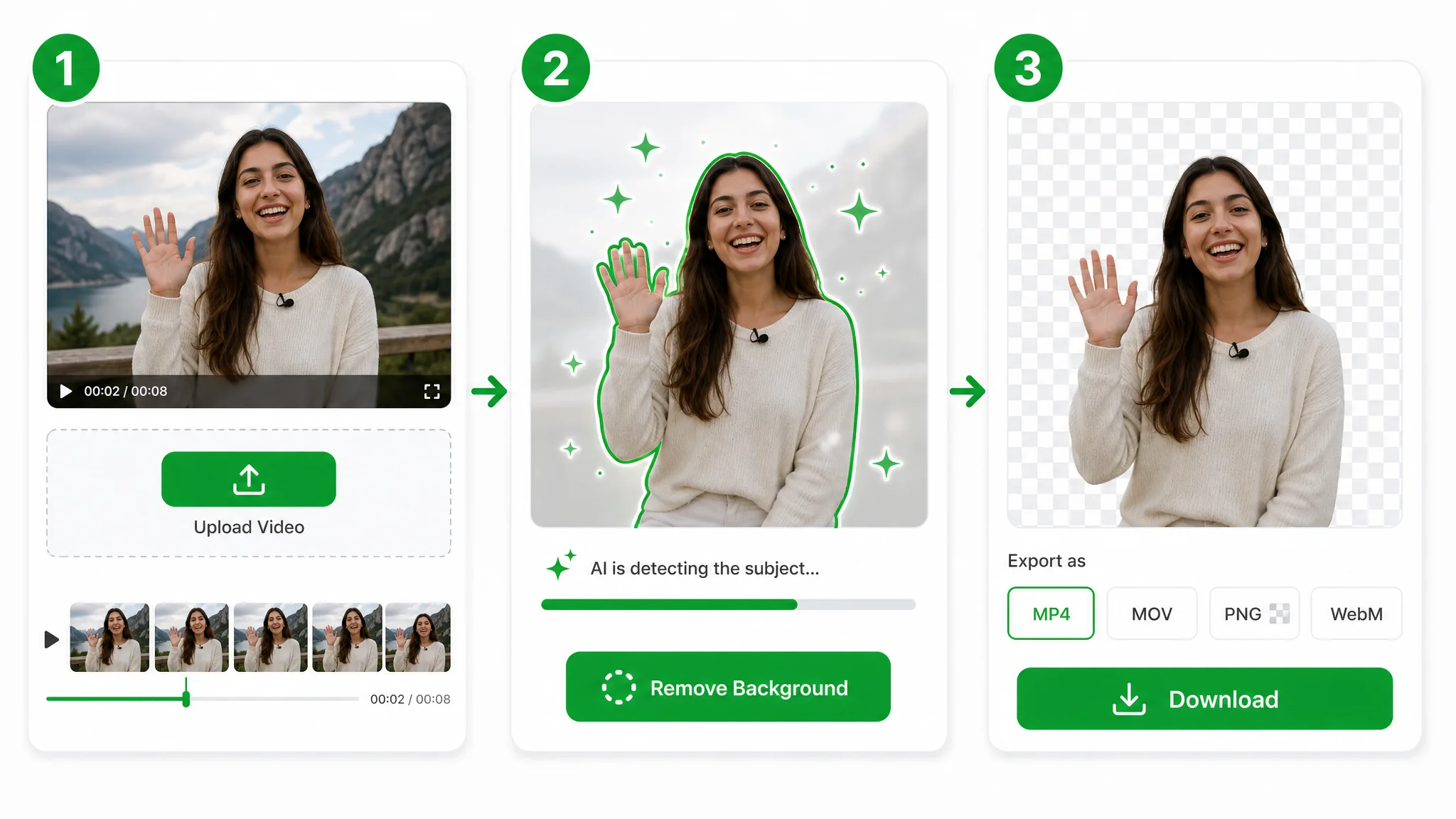
Drop in an MP4, MOV, or WebM with no timeline or node tree to wire up — the fastest way to remove background davinci resolve users usually build by hand on the Color page.
The model isolates your subject automatically, so you skip the masking, tracking, and qualifier tweaks a manual davinci resolve background remover workflow demands.
Export a transparent WebM with full alpha and import it straight onto your timeline — no green screen remover davinci resolve key left to refine.
Put it to work
Interview plates, product inserts, and motion overlays — the clips you would remove background davinci resolve by hand. Pull the subject in seconds, then reimport it onto any backdrop.
Put products on clean or custom backgrounds for listings and ads.
Cut yourself out for Reels, Shorts, and TikTok overlays.
Create facecam overlays without a studio setup.
Place yourself over slides and screen recordings.
FAQ
Common questions on nodes, plugins, green screen, pricing, and how this davinci resolve background remover handles real footage.
You get an automatic cutout with a transparent export and no node setup. It runs in the browser, so there is nothing to render locally, and a remove background davinci resolve task that used to mean a Fusion graph now takes a single upload.
It is free to start. If you want to know how to remove background in davinci resolve free, this gets you there with no watermark. After that, credits are charged per second processed, so quick interview and product cutouts cost only the seconds they use.
There is no davinci resolve background remover plugin to install or license. The AI separates the subject from any backdrop automatically and exports it transparent, so you skip the qualifier tuning a plugin-driven pass still leaves you to refine by hand.
Yes. It works without a green screen remover davinci resolve key entirely. The subject is lifted from real-world footage with no chroma stage to light or clean up, so you can drop a green screen remover davinci resolve step out of the pipeline.
To key out white background davinci resolve footage, just upload the clip. The model separates the subject from a plain white or colored backdrop automatically, with no qualifier or luma key to dial in, and returns it on a clean transparent layer.
MP4, MOV, and WebM all upload. Process any of them and export a transparent WebM your editor reads natively. The WebM output carries full alpha, so the clip reimports onto your timeline as a real layer, not a flattened box.
| Feature | This tool | DaVinci Resolve |
|---|---|---|
| Transparent export | Real WebM (VP9) alpha export straight from the browser | DaVinci Resolve often returns a flatter or more gated export path |
| Quick test without watermark | Free to start and watermark-free | DaVinci Resolve is more likely to gate clean exports behind plan limits |
| Workflow setup | Upload, remove, and download without a timeline rebuild | DaVinci Resolve usually asks for more app-side steps or editor cleanup |
Related tools
Other tools for removing, replacing, and keying video backgrounds.

The same clean cutout Runway gives you — a runway remove background pass without the subscription. Free to start, and you pay only for the seconds you process. No watermark, clean transparent export.
Try now
Switch from Unscreen and cut any video background for free — no upload cap, no watermark. The same one-click cutout for an unscreen video export or a looping unscreen gif, nothing to install.
Try now
Run a faster CapCut remove background flow online — one click, no Pro plan, no watermark, no chroma key CapCut setup, just a true transparent export.
Try nowUpload a clip and get a transparent subject in seconds — the fastest way to remove background davinci resolve editors reach for, free and watermark-free.
Try the DaVinci Resolve Background Remover — Free