Bulk Video Background Remover

Queue a folder of clips and get a batch transparent background on every one — no opening files one at a time, just a transparent background bulk export with full alpha.

Removing backgrounds from many videos in bulk at the same time.
或将文件拖到此处MP4、MOV、WebM · 最长 60s · 最高 4K · 100MB单次最多 20 个文件
免费试用
  • 无水印
  • 干净 alpha 导出
  • 4K画质
  • 长视频

Before / after

One queue, every clip cut out

Drag any sample to see the consistent matte each file gets in a batch transparent background run, so you know the whole queue will match before you process multiple videos at once.

处理前处理后

创作者与博主

对镜讲解类视频,发丝、肤色与柔边都干净利落。

处理前处理后

运动与动作

快速运动与飞溅水花,抠像边缘依旧锐利。

处理前处理后

3D 角色动画

把动画角色从任意渲染场景中抠出。

处理前处理后

游戏与特效角色

分离风格化角色,用于合成与叠层。

处理前处理后

社媒 UGC 带货

口播开箱、产品展示类成片,人物边缘干净利落。

处理前处理后

AI 与特效画面

把 AI 生成的画面几秒换到任意背景上。

处理前处理后

创作者与博主

对镜讲解类视频,发丝、肤色与柔边都干净利落。

处理前处理后

运动与动作

快速运动与飞溅水花,抠像边缘依旧锐利。

处理前处理后

3D 角色动画

把动画角色从任意渲染场景中抠出。

处理前处理后

游戏与特效角色

分离风格化角色,用于合成与叠层。

处理前处理后

社媒 UGC 带货

口播开箱、产品展示类成片,人物边缘干净利落。

处理前处理后

AI 与特效画面

把 AI 生成的画面几秒换到任意背景上。

Why it works

Batch transparent background, not one-offs

Parallel processing, consistent mattes, and no watermark — a transparent background bulk run handles the whole folder while you step away.

Whole folder in one drop

Upload dozens of clips at once and queue them together, instead of reopening the tool file after file to cut each one out. Shared settings apply to the entire queue, so one batch transparent background run uses the same backdrop and format across every upload — exactly what you want when a folder of clips all needs to match for the same project or product line.

去除背景
Many video clips cut out onto transparent checkerboards at the same time.

Hands-free processing

The queue runs back to back on its own, so a transparent background bulk job finishes while you work on something else entirely. You set it up once and walk away rather than babysitting each render, which is the whole reason to process multiple videos as a batch instead of opening, exporting, and closing them one tedious clip at a time.

免费试用
A batch of clips cut out with consistent quality and green check badges.

Consistent across the set

Every clip gets the same hair-fine matte and full alpha, so a batch never has one cutout that looks rougher than the rest. Consistency is what makes a batch transparent background usable in a catalog or an ad set, where mismatched edges would stand out the moment the clips sit side by side on the same page or in the same feed.

更换背景
A whole batch of clips given fresh new backgrounds in one pass.

Editor-ready output

Each batch video cutout exports as a transparent WebM that drops straight into your timeline, with alpha already baked in. There is nothing to key on your side, so a whole transparent background bulk set composites in minutes — stack, scale, and place each subject over any scene the way you would a normal layer, with no per-file cleanup.

立即开始
Many clips automatically cut out transparent with a batch progress bar.

Step by step

Batch transparent background in three steps

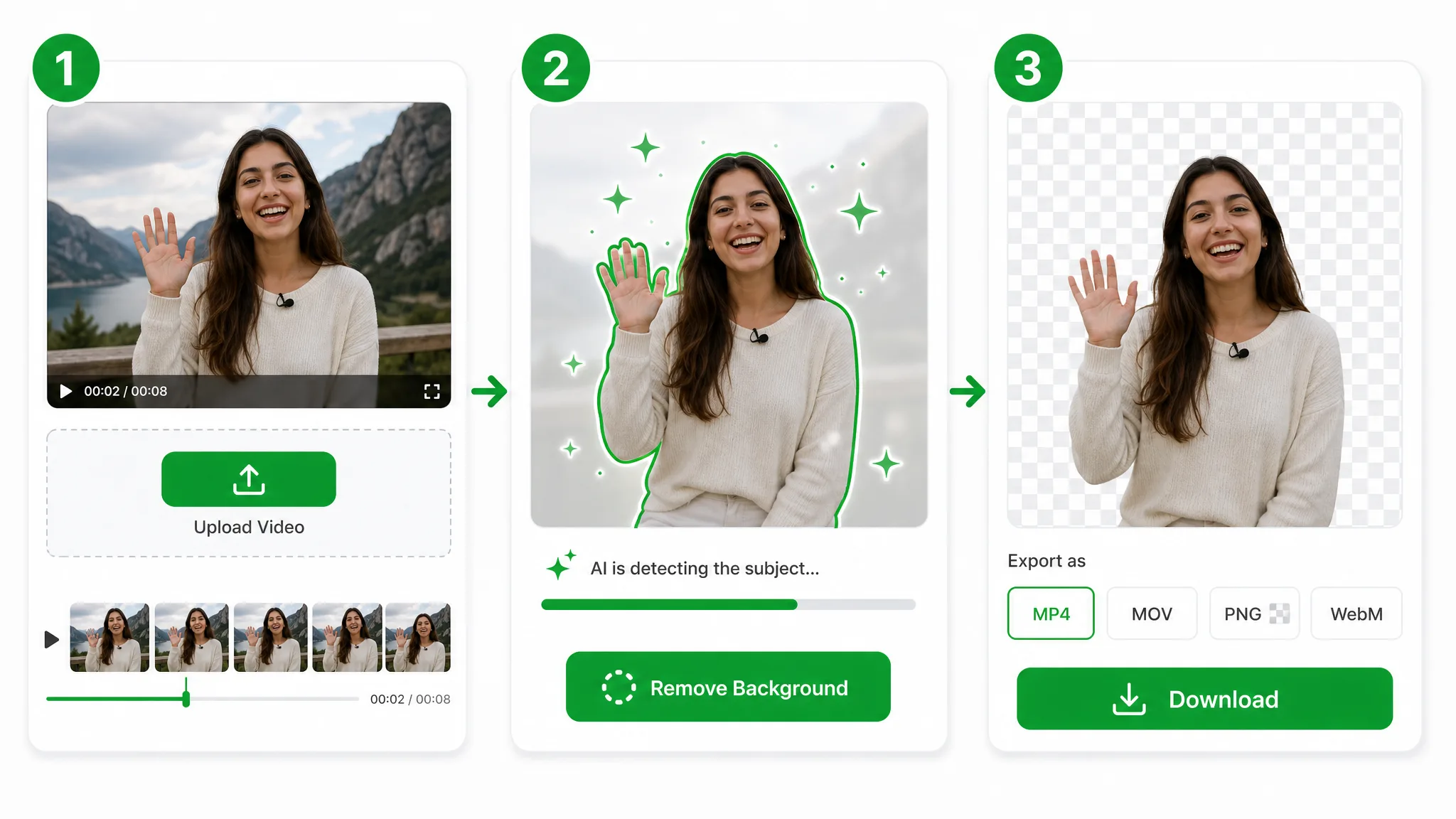
Upload the whole set, let the queue run hands-free, and download every transparent cutout — three steps to a batch transparent background with no per-file editing in between.

Three-step overview of removing a video background: upload, let the AI cut out the subject, then download the transparent result.
  1. 1

    Upload the whole batch transparent background queue

    Drop in multiple MP4, MOV, or WebM files at once — no need to open them one clip at a time before each transparent cutout.

  2. 2

    Process them transparent background bulk

    The AI runs every upload back to back, so a transparent background bulk run finishes hands-free — no keyframing, green screen, or per-file masking.

  3. 3

    Download every cutout

    Grab each transparent WebM with full alpha — a whole set of clean cutouts ready to drop into any editor that supports alpha video.

Where it helps

When one clip is never enough

Product catalogs, course libraries, and ad variants — run a transparent background bulk job across the whole batch at once when every clip has to match for the same project.

Agencies & catalogs

Clear backgrounds across a whole product catalog in one batch.

Many product videos batch processed transparent.

Course libraries

Cut out instructors across an entire lesson library at once.

Many lesson videos batch processed transparent.

Marketplace listings

Give every listing a clean background without one-by-one edits.

Many marketplace listing clips cleaned in bulk.

Social batches

Process a week of short clips together and post on schedule.

Many short social clips cut out transparent at once.

FAQ

People also ask about batch background removal

Common questions on queue size, supported formats, and keeping quality consistent across a batch transparent background run.

Upload the whole set and queue one batch transparent background job. The AI processes every clip back to back with shared settings, then lets you download each cutout — no opening files one at a time and no per-clip setup before the queue runs.

Cut out the whole folder at once

Upload your clips and run a batch transparent background job — free, no watermark, every cutout exported with full alpha.

Run a Batch Transparent Background — Free