Best Davinci Resolve Alternative for Video Background Removal

Need to remove background davinci resolve style without the node graph? Do it online for free — one click pulls your subject out, with no qualifier nodes and a clean transparent export.

A better alternative to DaVinci Resolve for removing a video background to transparent.
或将文件拖到此处MP4、MOV、WebM · 最长 180s · 最高 4K · 100MB
没有视频?试试这些:
免费试用
  • 无水印
  • 干净 alpha 导出
  • 4K画质
  • 长视频

Check the edges

Source clip beside the lifted subject

Wipe across the sample to judge the cutout against what a manual qualifier pass would give you — the remove background davinci resolve result, without the node tree.

处理前处理后

创作者与博主

对镜讲解类视频,发丝、肤色与柔边都干净利落。

处理前处理后

运动与动作

快速运动与飞溅水花,抠像边缘依旧锐利。

处理前处理后

3D 角色动画

把动画角色从任意渲染场景中抠出。

处理前处理后

游戏与特效角色

分离风格化角色,用于合成与叠层。

处理前处理后

社媒 UGC 带货

口播开箱、产品展示类成片,人物边缘干净利落。

处理前处理后

AI 与特效画面

把 AI 生成的画面几秒换到任意背景上。

处理前处理后

创作者与博主

对镜讲解类视频,发丝、肤色与柔边都干净利落。

处理前处理后

运动与动作

快速运动与飞溅水花,抠像边缘依旧锐利。

处理前处理后

3D 角色动画

把动画角色从任意渲染场景中抠出。

处理前处理后

游戏与特效角色

分离风格化角色,用于合成与叠层。

处理前处理后

社媒 UGC 带货

口播开箱、产品展示类成片,人物边缘干净利落。

处理前处理后

AI 与特效画面

把 AI 生成的画面几秒换到任意背景上。

Why skip the node graph

Less work than the remove background davinci resolve route

No qualifiers, no tracking, and no render — the remove background davinci resolve result you were after, without the Fusion nodes and color-page masking.

No nodes or qualifiers to wire

Skip building a qualifier, refining mattes, and tracking the mask across every frame. The subject is separated automatically the moment your file finishes uploading, with no Fusion graph to assemble. This is the whole reason to remove background davinci resolve work this way: a task that normally means a careful node tree on the Color page collapses into one upload, and the cutout comes back clean.

去除背景
已去除背景的电商产品视频,展示模特干净的透明 alpha 抠像效果。

Runs in the browser, not on your GPU

Nothing renders locally, so an aging laptop handles the cutout exactly as a workstation would, with no Studio license or hardware decode to budget for. A manual davinci resolve background remover pass leans hard on your GPU and a paid tier for the better tools; here the processing happens online, which means slow exports and render-time crashes stop being part of the job.

免费试用
自动从普通素材中去除背景的健身博主视频。

A true alpha export to reimport

Your subject comes back on a transparent layer that drops straight onto your timeline, instead of arriving as a flattened clip you have to key all over again. That genuine alpha is what makes the remove background davinci resolve round-trip painless — reimport the WebM or ProRes, stack it over a new plate, and the edges hold with no second matte to build.

更换背景
自动去背景后,将创作者视频一键替换为全新场景。

No green screen needed first

It lifts the subject from any real-world background, so there is no chroma stage to light, shoot, or clean up before the cutout works. Where a green screen remover davinci resolve setup assumes you already captured against an even green wall, this reads an ordinary clip directly, which means location footage and handheld phone shots separate just as cleanly.

立即开始
已去除背景的讲师讲解视频,呈现干净的长视频课程画面。

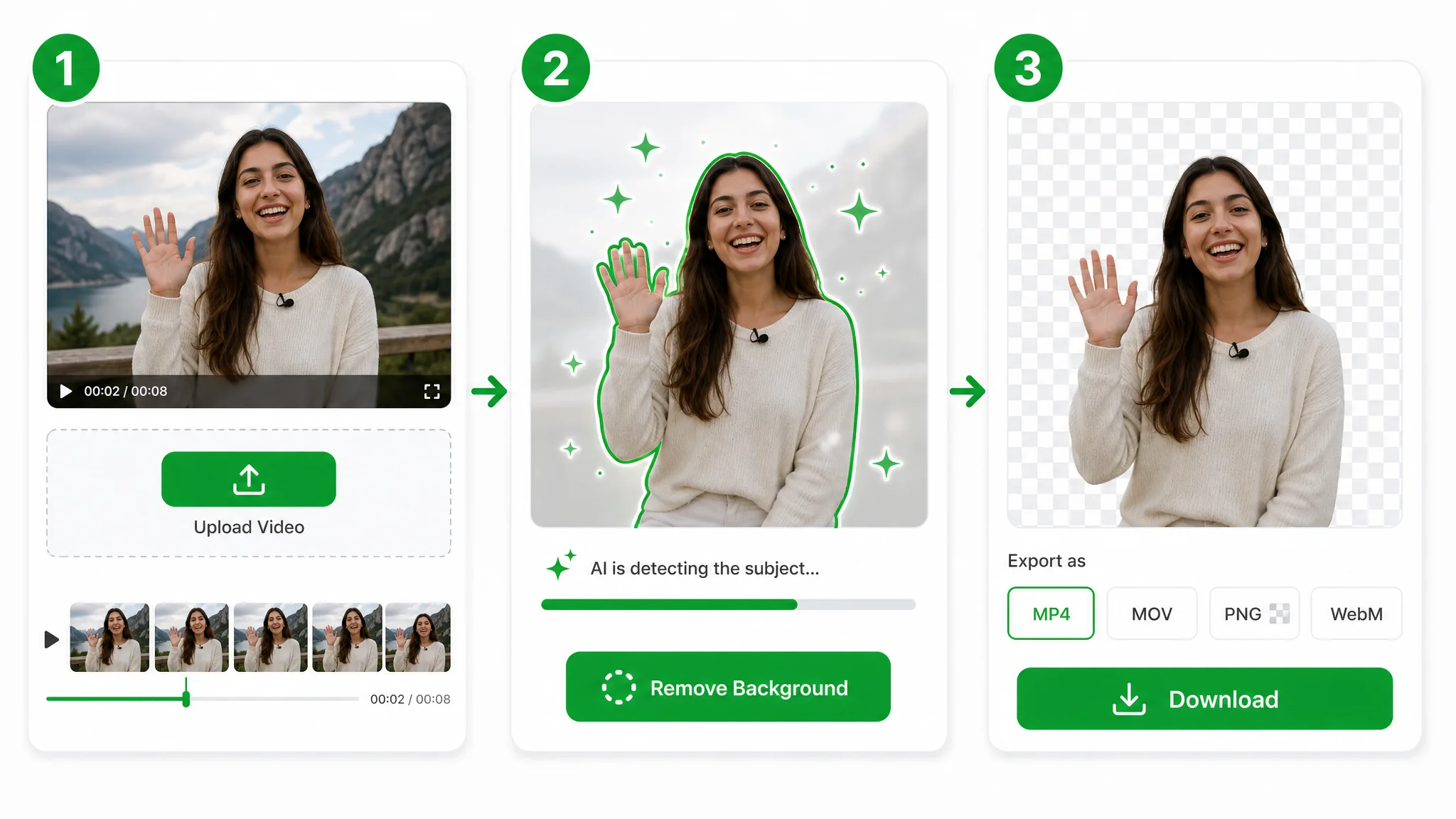
The flow

Three steps, no node tree

Upload your clip, let the AI separate the subject, and download a clean transparent file — three steps where a manual remove background davinci resolve pass would take a dozen.

Three-step overview of removing a video background: upload, let the AI cut out the subject, then download the transparent result.
  1. 1

    Upload, skip the Fusion page

    Drop in an MP4, MOV, or WebM with no timeline or node tree to wire up — the fastest way to remove background davinci resolve users usually build by hand on the Color page.

  2. 2

    Let the AI cut the subject

    The model isolates your subject automatically, so you skip the masking, tracking, and qualifier tweaks a manual davinci resolve background remover workflow demands.

  3. 3

    Drop the result back in your edit

    Export a transparent WebM with full alpha and import it straight onto your timeline — no green screen remover davinci resolve key left to refine.

Put it to work

Where remove background davinci resolve edits get easier

Interview plates, product inserts, and motion overlays — the clips you would remove background davinci resolve by hand. Pull the subject in seconds, then reimport it onto any backdrop.

电商与产品

把产品放到干净或自定义背景上,用于商品图与广告。

电商产品视频去除背景后置于干净的自定义背景上,用于商品详情页。

社媒与 UGC

把自己抠出来做 Reels、Shorts、TikTok 叠层。

把创作者从视频中抠出作为透明叠层,用于竖屏 Reels、Shorts 或 TikTok 短片。

游戏与直播

不用搭建影棚也能做面部摄像头叠层。

去除背景的主播面部摄像头画面,可直接叠加到游戏画面上。

课程与教程

把自己叠在幻灯片和录屏之上。

把讲师从视频中抠出并叠加到幻灯片上,用于在线课程或教程。

FAQ

Ask anything about the DaVinci Resolve alternative

Common questions on nodes, plugins, green screen, pricing, and how this davinci resolve background remover handles real footage.

You get an automatic cutout with a transparent export and no node setup. It runs in the browser, so there is nothing to render locally, and a remove background davinci resolve task that used to mean a Fusion graph now takes a single upload.

Cut the subject, skip the nodes

Upload a clip and get a transparent subject in seconds — the fastest way to remove background davinci resolve editors reach for, free and watermark-free.

Try the DaVinci Resolve Background Remover — Free