Blur Video Background

Blur video background automatically while your subject stays sharp. One pass softens everything behind them for a clean, cinematic depth-of-field look.

Blurring a video background while keeping the subject sharp and in focus.
或将文件拖到此处MP4、MOV、WebM · 最长 60s · 最高 4K · 100MB
没有视频?试试这些:
免费试用
  • 无水印
  • 干净 alpha 导出
  • 4K画质
  • 长视频

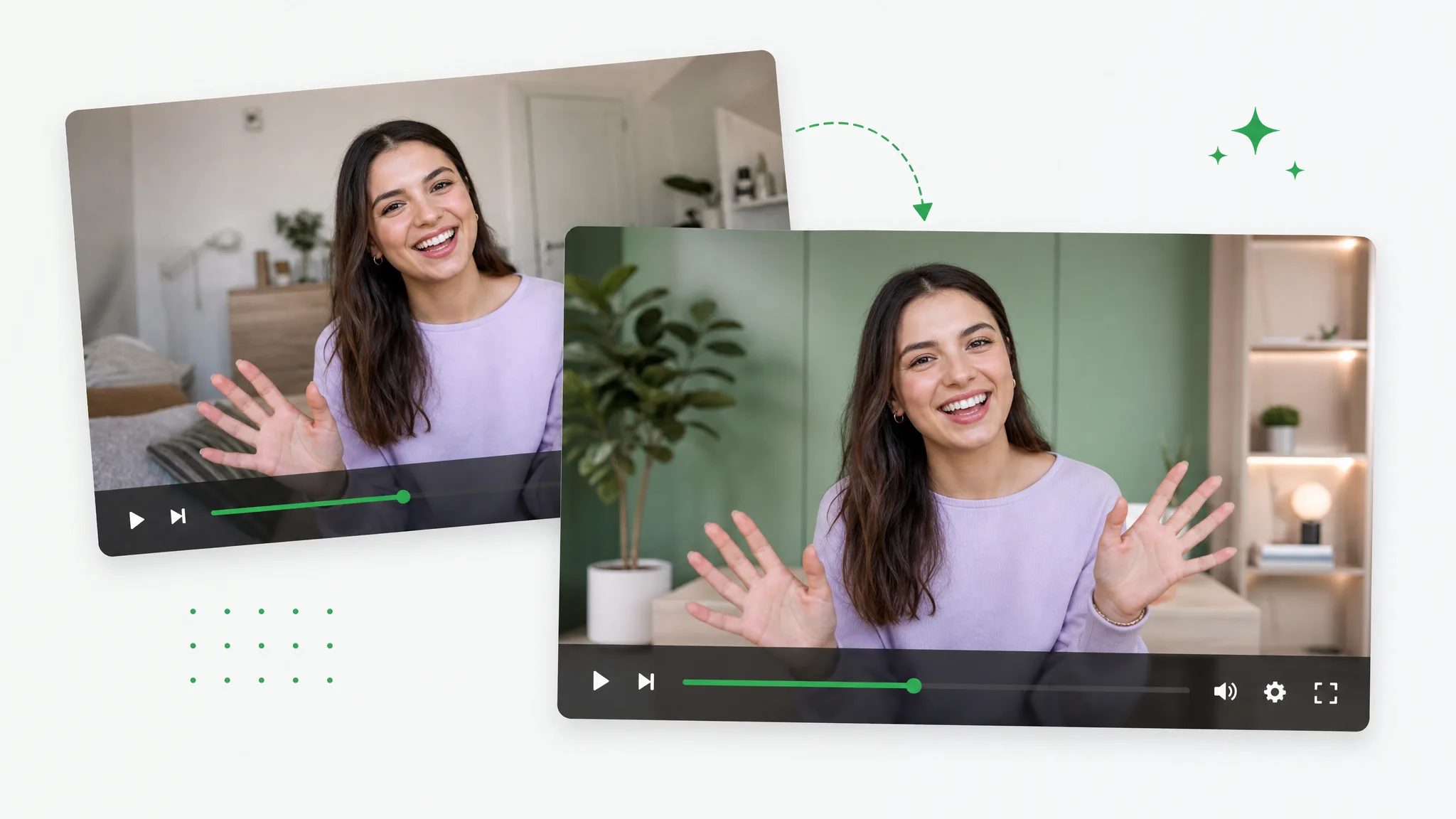
Before / after

See the backdrop melt out of focus

Drag any sample to compare a busy original with the same shot under a clean video blur, and see exactly where the focus holds before you blur video online on your own footage.

处理前处理后

杂乱房间虚化

人物保持锐利,杂乱背景柔和虚化。

处理前处理后

隐私背景柔化

在任意房间开会都显得专业。

处理前处理后

电影级背景虚化

给任意主体加柔和的相机式背景虚化。

处理前处理后

动作画面柔焦

快速运动的主体保持锐利,背景柔和虚化。

处理前处理后

角色柔焦

用平滑自然的背景虚化营造景深。

处理前处理后

CGI 电影级虚化

给 CGI 镜头加柔和的景深背景。

处理前处理后

杂乱房间虚化

人物保持锐利,杂乱背景柔和虚化。

处理前处理后

隐私背景柔化

在任意房间开会都显得专业。

处理前处理后

电影级背景虚化

给任意主体加柔和的相机式背景虚化。

处理前处理后

动作画面柔焦

快速运动的主体保持锐利,背景柔和虚化。

处理前处理后

角色柔焦

用平滑自然的背景虚化营造景深。

处理前处理后

CGI 电影级虚化

给 CGI 镜头加柔和的景深背景。

Why it works

Depth of field without a fast lens

Sharp subject, smooth falloff, and no watermark — this video blur looks as clean as a prime lens would, so you can blur video background straight from any phone clip with none of the manual masking a real defocus usually takes.

Only the backdrop goes soft

The AI cuts your subject from the scene before anything is softened, so when you blur video background the defocus lands purely behind them while their face, hair, and edges stay tack-sharp. That separation is what keeps the video blur believable — instead of smearing the whole frame, the tool protects the one thing the viewer should look at and pushes only the clutter out of focus.

去除背景
A subject kept perfectly sharp while only the background is softly blurred.

Dial the blur to taste

Drag the strength slider from a subtle haze that just hides a messy room to a deep, dreamy defocus, so you control exactly how much video blur the clip gets. Different shots need different amounts — a tidy office only needs a touch, while a busy street behind you wants a heavier wash — and being able to blur video online to the precise level you want keeps every result looking intentional.

免费试用
Adjustable background blur strength while the subject stays sharp and in focus.

Smooth, natural falloff

The softness ramps gently outward from the subject instead of cutting off in a hard ring, so the video blur reads like a real camera lens rather than a flat filter dropped over the footage. This matters most when you blur video background for a professional clip — a natural depth-of-field falloff is the difference between footage that looks shot on a fast prime and an obvious digital effect that gives the edit away.

更换背景
A cluttered private room blurred while the subject stays clearly in focus.

Steady on every frame

Tracking follows the subject through the entire clip, so the blurred backdrop never flickers, breathes, or snaps back into focus as the person walks, turns, or leans out of frame. Cheaper tools wobble the moment anything moves; here the video blur holds rock-steady through every pan and step, which is exactly what a recorded call or a moving vlog shot needs to stay watchable.

立即开始
A stable background blur kept across a long video while the subject stays sharp.

Step by step

Blur video background in three steps

Upload your clip, set how soft the backdrop gets, and blur video online in one pass — three steps to blur video background, with no timeline editing in between.

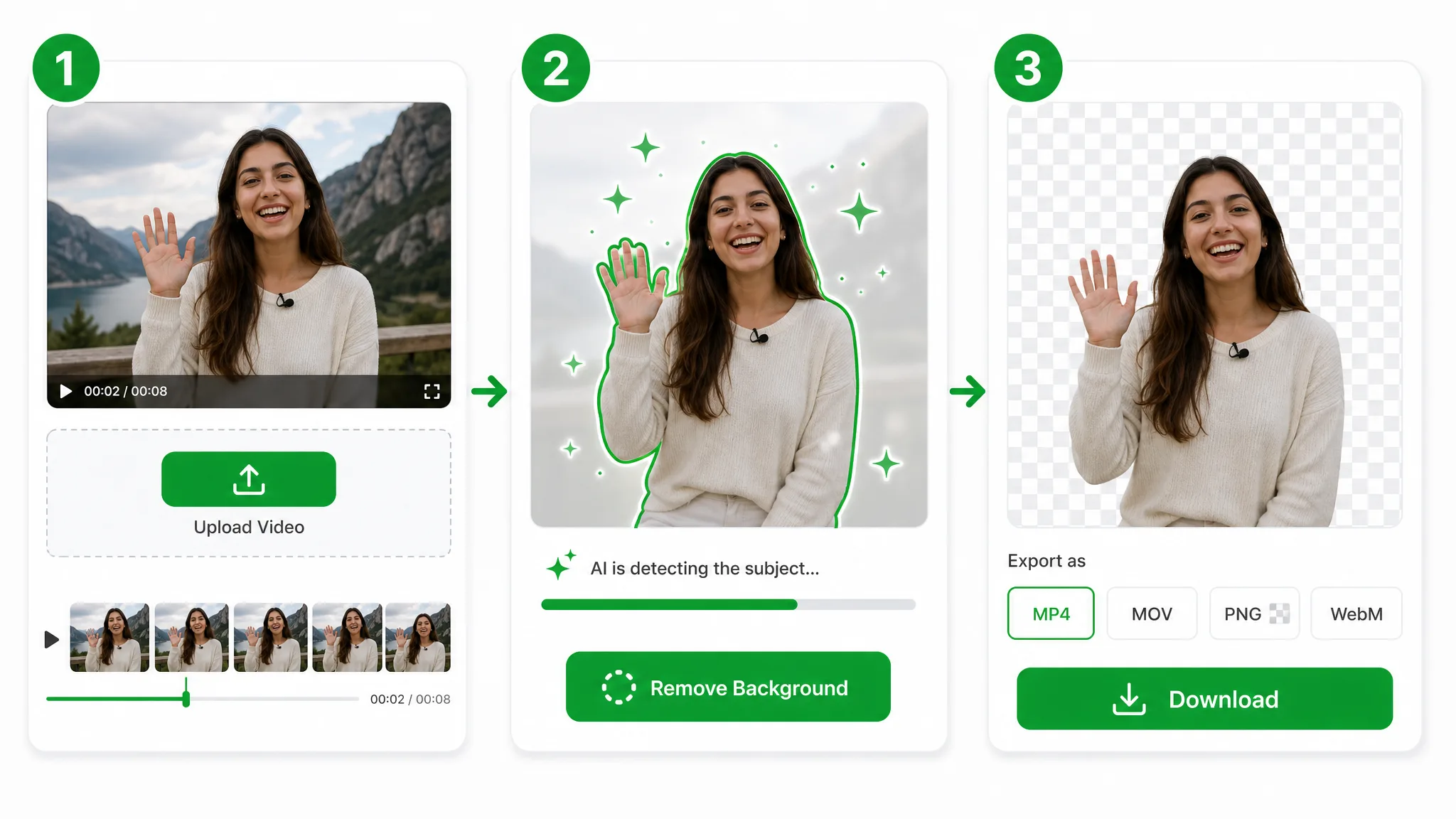
Three-step overview of removing a video background: upload, let the AI cut out the subject, then download the transparent result.
  1. 1

    Upload your clip

    Drop in an MP4, MOV, or WebM and the AI locks onto your subject, so the person up front stays perfectly in focus while everything behind them is fair game.

  2. 2

    Set the video blur

    Pick how strong the effect should be in a single drag — from a gentle haze to a deep, cinematic defocus behind your subject, with no editing skills needed.

  3. 3

    Export the soft-focus video

    Download a finished MP4 with the softened backdrop baked in — a clean depth-of-field shot ready to post or edit further.

Where it helps

When a messy backdrop has to disappear

Calls, vlogs, and product clips — add background blur to video to hide clutter and keep eyes on your subject, and a quick video blur is all it takes wherever a clean, distraction-free backdrop sells the shot.

Privacy on calls

Hide a cluttered or private room with a soft, natural background blur.

Video call background softly blurred for privacy.

Focus on the subject

Keep yourself sharp while a busy background melts into bokeh.

Subject kept sharp with a softly blurred background.

Clean meetings

Look professional from any room with a tasteful, stable blur.

Messy home office hidden behind a clean background blur.

Sensitive locations

Blur out signs, faces, or details you don't want on camera.

Background blurred to hide a sensitive location.

FAQ

People also ask about blurring a video background

Common questions on blur strength, sharp subjects, formats, and clip length — everything to know before you blur video background on a real clip.

Yes, it is free with no watermark or sign-up. Blur video online in seconds — upload your clip, let the AI soften everything behind your subject, and preview the result instantly. Quick social cuts never cost anything before you see how they turned out.

Soften everything behind your subject

Upload a clip and blur video background automatically, or blur video online in seconds — one clean pass for a real depth-of-field look, free and no watermark, with your subject staying sharp the whole way through.

Blur Video Background — Free